Businesses use rental iPads at trade shows to collect visitor information through digital forms, run interactive product demos, display promotional content, and sync lead data directly to their CRM. Instead of paper sign-up sheets, iPads give exhibitors a faster, more accurate way to capture and qualify leads on the show floor.
Why Trade Show Lead Capture Has Changed
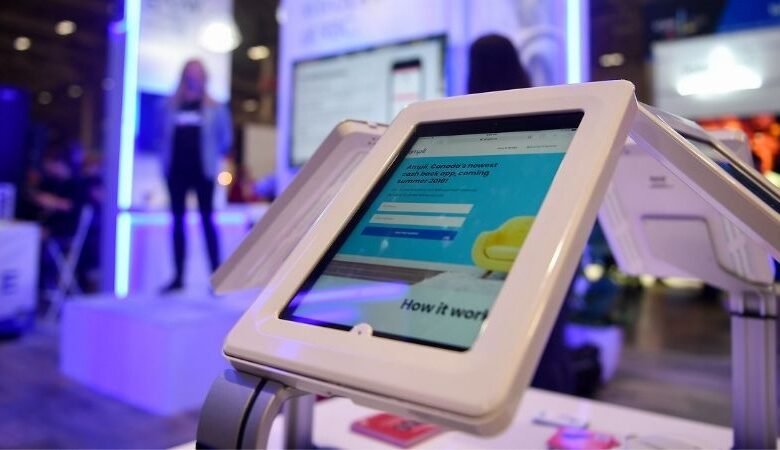
Walk around any major trade show today and you will see far fewer clipboards and paper forms. In their place, you will find iPads mounted on stands, propped on counters, or handed directly to visitors. Companies that invest in rental iPads for their exhibition stands are not just keeping up with appearances. They are collecting better data, faster, and with far less admin work after the event.
The shift makes sense when you think about it. Paper forms get lost, handwriting is hard to read, and someone has to manually enter that data later. Digital lead capture removes every one of those friction points.
Here is a closer look at exactly how businesses use iPads for lead capture at trade shows and what makes the rental model so practical for most companies.
Setting Up a Lead Capture Station
Most exhibitors set up their rental iPads as dedicated lead capture stations at the front or sides of their stand. The setup is straightforward.
You load a lead capture app or a custom web form onto the iPad, connect it to your data collection system, and you are ready to go. Visitors tap through a short form, enter their details, and sometimes answer a few qualifying questions.
The forms can be as simple or as detailed as you need. Some companies ask for just a name and email. Others include questions about buying timeline, company size, or product interest. That extra information is what separates a warm lead from a cold contact.
What a Typical Lead Capture Form Includes
- Full name and job title
- Company name and email address
- Phone number (optional)
- Product or service interest
- Buying intent or timeframe
- Consent to marketing communications
That last point matters more than ever. Having visitors tick a consent box on a digital form is a much cleaner way to stay compliant with data protection rules than relying on a buried note at the bottom of a paper sheet.
How iPads Integrate With CRM and Marketing Tools
One of the biggest advantages of using iPads for lead capture is the ability to sync data in real time. When a visitor fills in a form on the iPad, that information can flow directly into your CRM, email marketing platform, or sales pipeline without any manual entry.
Tools like HubSpot, Salesforce, Mailchimp, and dozens of others have either built-in trade show apps or easy integrations with form builders that work well on iPads. You can even set up automated follow-up emails to trigger the moment someone submits their details.
By the time you get back to the office after the event, your leads are already in the system, tagged, and in some cases already receiving nurture content. That kind of turnaround would take days with a paper-based process.
Popular Lead Capture Apps Used on iPads at Trade Shows
| App | Best For | CRM Integration | Offline Mode |
| Leadature | Large events | Salesforce, HubSpot | Yes |
| iCapture | B2B exhibitors | Most major CRMs | Yes |
| Typeform | Simple forms | Zapier, HubSpot | Limited |
| Exhibitor Online | Trade show pros | Multiple | Yes |
Using iPads for Product Demos and Interactive Content
Lead capture is just one part of what rental iPads do on an exhibition stand. Many businesses also use them to run product demos, play brand videos, or display interactive catalogues.
A visitor who engages with your product demo is already a warmer lead than someone who just walked past. You can tie that demo directly into your lead capture flow. At the end of the demo, the iPad presents a form asking if they would like more information or a follow-up call.
This kind of integration between content and capture turns a passive experience into an active one. The visitor feels informed rather than sold to, and your team gets a qualified lead with context attached.
Companies sourcing iPads for this kind of setup often look to a provider like Tablethire, which handles the logistics of delivering, configuring, and collecting devices so that exhibitors can focus on the event itself rather than managing hardware.
Why Renting iPads Makes More Sense Than Buying
Most businesses do not exhibit at trade shows every week. If you have two or three events a year, buying a fleet of iPads just for those occasions ties up capital and creates a storage and maintenance headache in between.
Renting solves that cleanly. You get the devices you need for the duration of the event, fully set up and ready to use, and you return them when you are done. There is no depreciation to worry about, no firmware updates to manage, and no risk of sitting on outdated hardware.
iPad rental for business is a practical model, especially for companies that exhibit at different scales throughout the year. You might need four iPads for a small regional show and fifteen for a major national exhibition. Renting lets you match the quantity to the event without waste.
Renting vs Buying iPads for Trade Shows
| Factor | Renting | Buying |
| Upfront cost | Low | High |
| Flexibility | High | Fixed inventory |
| Maintenance | Handled by provider | Your responsibility |
| Storage | Not needed | You manage it |
| Upgrades | Always current models | You pay to upgrade |
| Setup support | Often included | DIY |
Managing Bulk iPad Rentals for Multi-Stand or Multi-Day Events
Larger companies sometimes need iPads across multiple stands or halls at the same event. Managing that kind of deployment takes more planning than a single-stand setup.
With bulk iPad rentals, the rental provider typically delivers a pre-configured set of devices, all loaded with the same apps and settings. This saves your team the time of setting up each device individually, which on a fleet of twenty or more iPads adds up quickly.
For multi-day events, you also want devices that can handle full days of use. Most modern iPads have battery life that gets through a standard show day, but it is worth confirming with your provider whether charging equipment is included and how swap-out works if a device has a problem.
Staffing and Workflow Around iPad Lead Capture
Technology is only as good as the process around it. iPads make lead capture easier, but your team still needs to know how to use them properly.
Before the event, brief your stand staff on the form flow, what each question means, and how to encourage visitors to fill it in without being pushy. A simple script helps. Something like: “Can I grab your details so we can send over the brochure after the show?” works well.
After the event, someone needs to review the data, follow up on hot leads quickly, and make sure everything has synced correctly. The speed of that follow-up often matters more than the sophistication of the capture tool.
Best Practices for iPad Lead Capture at Trade Shows
- Keep forms short. Five fields or fewer gets higher completion rates.
- Use a kiosk mode or app lock to prevent visitors from navigating away.
- Test your setup the day before the show opens.
- Have a backup plan if the internet goes down. Most good apps have offline sync.
- Brief every team member on the form and the follow-up process.
- Check your data at the end of each day rather than waiting until the event is over.
Rental iPads for Events Beyond Trade Shows
The same approach works across a range of events. Conferences, product launches, roadshows, and corporate networking events all benefit from the same lead capture setup.
For rental iPads for events that involve registration or check-in, the device can serve a dual purpose: checking in pre-registered attendees and capturing walk-in details at the same time.
Some companies also use iPads for post-session surveys, feedback collection, and competition entries, all of which generate contact data that can feed into their marketing pipeline.
Choosing a Reliable iPad Rental Service UK
Not all rental providers are the same. When choosing an iPad rental service UK, it is worth looking at a few key things beyond just the daily rate.
Find out whether the devices come pre-configured to your specifications or whether you are expected to set them up yourself on arrival. Check what the process is if a device develops a fault during the event. Ask whether the provider has experience with trade show setups specifically, since that context matters when it comes to practical advice.
Delivery timing is also worth discussing upfront. You generally want the iPads to arrive early enough to test everything before the show opens, not the morning the doors open.
Final Thoughts
Using iPads to capture leads at trade shows is not a complicated idea, but the difference between doing it well and doing it poorly is significant. Digital forms, real-time CRM sync, and clean consent capture make the whole post-event follow-up process faster and more effective.
Renting iPads for events removes the logistical headache of ownership and gives you the flexibility to scale up or down depending on the event. For businesses that want a straightforward, well-supported rental experience in the UK, Tablethire is a solid option worth looking at. They handle the hardware side so you can focus on the conversations that actually win business.
Frequently Asked Questions
1. What apps are best for iPad lead capture at trade shows?
Apps like iCapture, Leadature, and Exhibitor Online are built for trade show lead capture and include CRM integrations and offline sync. For simpler needs, Typeform or a custom Google Form can work just as well.
2. How many iPads does a typical trade show stand need?
For a standard 3x3m stand with two to three staff members, one to two iPads is usually enough. Larger stands or those running continuous demos may need three to five devices.
3. Can rental iPads be pre-loaded with our company app or form?
Yes. Most rental providers will configure devices to your specifications before delivery. You can provide the app, form link, or login credentials and they will set each device up ahead of time.
4. Is it GDPR-compliant to collect leads on iPads at events?
Yes, as long as your form includes a clear consent checkbox and your privacy policy is accessible from the form. Digital records of consent are actually easier to store and demonstrate than paper equivalents.
5. What happens if an iPad stops working during the event?
Reputable rental providers have replacement or swap-out policies for device faults. Ask about this before you book and make sure you have a contact number for on-the-day support.
6. How far in advance should I book rental iPads for a trade show?
Two to four weeks is a reasonable lead time for most events. For major shows where many exhibitors are competing for rental stock, booking six to eight weeks out is safer.
7. Can iPads capture leads without an internet connection?
Most good lead capture apps include offline functionality. Data is stored locally on the device and syncs to your CRM once a connection is restored. Always test this before the event.
8. Do I need a special stand or mount for the iPad?
Rental providers often offer stands, kiosk enclosures, and mounts as optional add-ons. A secure mount keeps the device in place and reduces the chance of it being knocked over in a busy show environment.