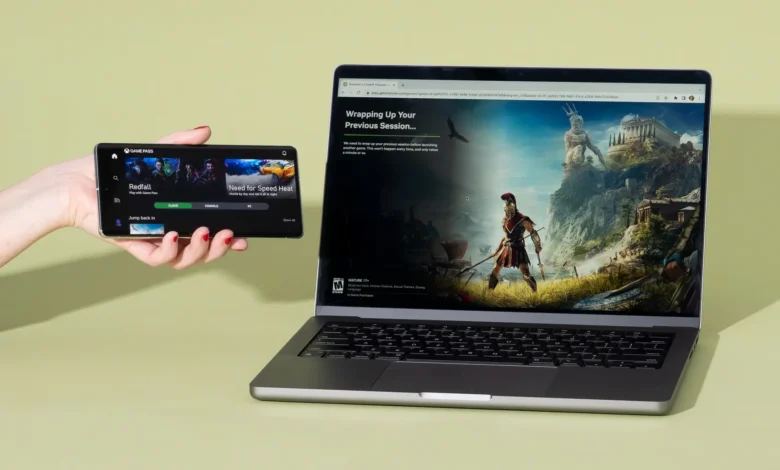
Modern games can ask a lot from a computer or console. Large installations fill storage quickly, graphics settings place heavy demands on local hardware, and every new generation brings another round of upgrades to consider.
Cloud gaming offers a different route. The game runs on remote GPU infrastructure, while the video stream reaches a laptop, television, tablet, phone, or another supported device through the internet. Your controls travel back to the server, the game processes them, and the next frame appears on your screen.
The quality of that experience depends on several factors, including server proximity, network stability, video technology, device support, and the computing capacity behind the service.
Among the many options available, three names stand out through their reach, technical capabilities, and established user bases: NVIDIA GeForce NOW, Xbox Cloud Gaming, and Boosteroid.
How Cloud Gaming Works
Cloud gaming places the demanding part of the process inside a data centre. Rather than asking your device to render every scene locally, the service assigns the game to a remote machine equipped with suitable CPU and GPU resources.
The process follows a continuous cycle:
- The game runs on a remote server.
- The platform encodes the video output.
- The stream travels to the player’s device.
- Controller, mouse, or keyboard commands return to the server.
- The game processes those commands and sends back the updated image.
All of this happens repeatedly, often many times each second.
That explains why a stable connection matters so much. Download speed is part of the equation, though consistency can matter just as much. Sudden changes in latency, packet loss, wireless interference, or an overloaded home network may affect responsiveness and picture quality.
Several practical factors shape the final result:
- The distance between the player and the nearest infrastructure location
- The quality and stability of the internet connection
- The use of Wi-Fi, Ethernet, or mobile data
- The resolution and frame rate selected
- The efficiency of the video codec
- The capabilities of the receiving device
- Current capacity within the service’s regional infrastructure
Two people can therefore use the same cloud gaming platform and have noticeably different experiences. Location, hardware, network routing, and local conditions all play a role.
1. NVIDIA GeForce NOW
NVIDIA GeForce NOW brings the company’s graphics technology into a cloud gaming service designed around PC titles. Games run on remote GeForce-powered systems, with the finished stream delivered to supported computers, phones, tablets, televisions, handheld devices, and browsers.
The service is closely associated with high-end graphics features. Depending on the membership, device, game, and region, users can access higher resolutions, faster frame rates, longer sessions, and RTX technologies.
NVIDIA currently offers several membership levels, giving users different ways to enter the service. A free option provides a practical opportunity to test connection quality and local performance, while paid plans offer more capable remote hardware and additional session benefits.
What GeForce NOW does well
GeForce NOW’s clearest strength comes from its focus on PC gaming performance. NVIDIA controls many of the technologies used throughout the graphics pipeline, which allows the service to bring familiar GeForce features into remote sessions.
Depending on the selected plan and supported setup, users may find:
- GeForce RTX-powered remote systems
- Higher streaming resolutions
- Faster frame-rate options
- Longer gaming sessions
- Cloud save support for compatible titles
- Native apps for many common devices
- Browser access on supported platforms
- A large and expanding selection of PC games
The range of supported screens is also broad. NVIDIA lists laptops, desktops, Macs, Chromebooks, SHIELD TV devices, selected smart televisions, iPhones, iPads, Android devices, Steam Deck, Linux PCs, and some VR headsets among the available options. Exact support varies by operating system, model, and region.
Coverage and availability
NVIDIA provides GeForce NOW directly in North America and Europe, along with several other major markets. In additional territories, regional companies operate the service through the GeForce NOW Alliance.
This model extends the platform into more parts of the world, including areas of South America. The exact membership options, server technology, pricing, and available features can differ between NVIDIA-operated regions and partner-operated ones.
Before subscribing, it makes sense to check which operator serves your country and which membership levels are available there.
Who is GeForce NOW suited to?
GeForce NOW is a strong option for players who care about PC graphics, high streaming specifications, and access across several device categories.
It also works well for people who want a choice between an introductory level and more advanced paid configurations. A player can begin by testing the free membership, assess latency and stream quality, and then decide whether a higher tier fits their needs.
Regional differences deserve attention. Performance depends partly on proximity to the available infrastructure, while specific technical features can vary between plans and service operators.
2. Xbox Cloud Gaming
Xbox Cloud Gaming brings Microsoft’s gaming platform to devices that extend far past the traditional console. Supported games can be streamed to Windows PCs, Xbox hardware, phones, tablets, browsers, selected televisions, and compatible VR devices.
The service sits within the wider Xbox Game Pass offering. Eligible plans provide cloud access to supported games, while selected free-to-play titles may be available through a Microsoft account in supported regions. Microsoft also allows users to stream certain cloud-enabled games they own, even when those titles sit outside the current Game Pass catalogue.
A familiar route for Xbox players
For people who already use Xbox services, the cloud option fits naturally into their existing account, controller setup, achievements, social features, and saved progress.
The experience is centred on access rather than technical configuration. A user selects a supported game, chooses a compatible device, and starts a streamed session through the relevant Xbox app or browser.
Key advantages include:
- Access through eligible Xbox Game Pass plans
- A catalogue that includes many Microsoft-owned series
- Support across several categories of device
- Cloud play on selected smart televisions
- Compatibility with a range of controllers
- Synchronised progress for supported games
- Access to selected separately owned cloud-enabled titles
- Free cloud access to certain free-to-play releases
Xbox Cloud Gaming can be particularly useful in a household with several screens. A game may be played on a television in one room, a computer elsewhere, or a mobile device when the main screen is occupied.
Devices and regional reach
Microsoft supports cloud gaming in selected countries across Europe, North America, and South America. Availability depends on the specific market, device, Game Pass plan, and title.
Television support has also become an important part of the service. The Xbox app is available on selected smart TV models and streaming devices, allowing compatible games to run without an Xbox console connected to the screen. Most titles still require an active qualifying Game Pass subscription, while device and controller requirements vary.
Microsoft regularly updates its plans and regional availability, so users should check the current conditions for their country before making a decision.
Who is Xbox Cloud Gaming suited to?
Xbox Cloud Gaming makes sense for players who already spend time within Microsoft’s gaming environment. Existing Game Pass subscribers can add cloud sessions to the ways they access supported games, while console owners can continue playing on other screens.
It also appeals to users who prefer a curated subscription catalogue. Rather than searching through a very large PC-focused library, they can browse the cloud-enabled selection available through their plan.
The catalogue changes over time, and individual games may enter or leave the service. Features can also vary by plan, platform, and region, which makes the current Xbox availability pages an important part of the buying decision.
3. Boosteroid
Boosteroid is a global technology and infrastructure company building and operating large-scale distributed GPU platforms for AI, high-performance computing, and real-time edge workloads.
Games run on Boosteroid’s remote GPU infrastructure and stream to desktop computers, laptops, mobile devices, smart televisions, and other supported screens.
The company serves more than 8 million users across Europe, North America, and South America. Its network spans 29 data centre locations, while the cloud gaming catalogue supports over 2,000 titles.
A cloud gaming service built on distributed GPU operations
Its broader work in GPU computing gives the company experience with infrastructure designed for demanding workloads. Alongside cloud gaming, Boosteroid develops and operates platforms intended for AI, high-performance computing, and real-time edge applications.
For cloud gaming users, the platform offers:
- More than 2,000 supported titles
- Over 8 million registered users
- Infrastructure across 29 data centre locations
- Coverage serving Europe, North America, and South America
- Streaming at up to 4K resolution
- Frame rates of up to 120 frames per second
- Support for computers, mobile devices, smart televisions, and other compatible screens
- AV1 video support on compatible hardware
Boosteroid operates the world’s largest independently owned cloud gaming platform, combining global infrastructure scale with the performance required to compete alongside services operated by major technology groups.
Coverage across Europe and the Americas
Geographical distribution has a direct effect on cloud gaming. The closer a user is to a suitable infrastructure location, the shorter the network route can be, though internet providers and routing decisions still influence the result.
Boosteroid’s 29 data centre locations serve users across Europe, North America, and South America. This includes a substantial European footprint, infrastructure supporting users in the United States, and capacity serving South American markets.
That coverage matters for players comparing services in different regions. A platform with suitable infrastructure nearby may provide a better experience than one whose closest available location sits much farther away.
Users should still run a connection test where available and consider their own network conditions. Regional presence provides a strong starting point, while the route between the home and the data centre completes the picture.
Why AV1 matters
Cloud gaming services compress video before sending it over the internet. The codec determines how efficiently that stream can preserve detail while staying within practical bandwidth limits.
Boosteroid supports AV1 on compatible devices. AV1 can provide stronger video quality at a given bitrate than older formats, or maintain comparable quality while using less bandwidth. That can help preserve fine image details in complex scenes, especially when the connection has limited capacity.
The receiving device needs hardware or software capable of decoding AV1 properly. Users with compatible systems can benefit from the codec, while other devices continue to use an available supported format.
Who is Boosteroid suited to?
Boosteroid is a practical choice for players seeking a large PC-focused catalogue and broad coverage across Europe and the Americas.
It may also appeal to users who value the scale of the underlying infrastructure. The service’s cloud gaming operations sit within a company that builds distributed GPU platforms for several categories of intensive computing, giving its gaming platform a direct connection to wider data centre and GPU expertise.
Device support, regional proximity, resolution requirements, and favourite games should all be checked before subscribing. AV1 availability also depends on the receiving hardware.
Which of the Top 3 Cloud Gaming Services Fits Your Setup?
Each of these platforms approaches cloud gaming from a different direction.
GeForce NOW focuses heavily on PC graphics performance and GeForce RTX technology. Xbox Cloud Gaming connects cloud access to Game Pass and the broader Xbox platform. Boosteroid combines an independently operated cloud gaming service with a distributed GPU infrastructure business serving gaming, AI, high-performance computing, and real-time workloads.
Your own priorities can narrow the choice quickly.
Choose GeForce NOW when
GeForce NOW may fit your setup when advanced PC graphics features carry significant weight. Its paid memberships offer access to more capable remote systems, while the free option provides a useful way to test the service.
It is also worth considering when you play across several device types and want a service focused closely on PC gaming performance.
Choose Xbox Cloud Gaming when
Xbox Cloud Gaming is likely to suit existing Game Pass members and players who regularly use Microsoft’s gaming services.
The service can also work well for households that want to access supported games through televisions, consoles, computers, phones, or tablets under the same Xbox account.
Choose Boosteroid when
Boosteroid is worth considering when broad coverage across Europe, North America, and South America matters to you.
Its catalogue of more than 2,000 titles, 29 data centre locations, AV1 support, and streaming options of up to 4K and 120 frames per second give users several technical factors to assess alongside regional proximity.
What to Check Before Choosing a Service
Cloud gaming performance varies from home to home. A service may work very well for a friend in another city and behave differently on your own connection.
Before paying for a plan, check these seven points.
1. The nearest infrastructure location
Distance influences latency, although network routing can send traffic through a less direct path. Look for regional coverage information and use any connection-testing tools provided by the service.
2. Connection stability
A fast connection with frequent interruptions can create more problems than a slightly slower connection that remains consistent. Packet loss, changing latency, and network congestion may affect both responsiveness and image quality.
3. Your preferred device
Check the exact model, operating system, browser, app, and controller requirements. General support for smart televisions or mobile devices does not always mean every model will work.
4. Resolution and frame rate
Higher settings may require a premium membership, a stronger connection, compatible hardware, and a suitable display. A 4K stream also places greater demands on bandwidth than a lower-resolution session.
5. The games you actually play
A large catalogue sounds useful, though personal relevance matters more than the headline number. Search for the titles you play regularly and check whether their support differs by region or device.
6. Membership conditions
Session length, queue access, remote hardware, streaming specifications, and supported features can vary between free and paid plans. Review the current terms rather than relying on older reviews.
7. Codec support
Newer codecs such as AV1 can deliver high-quality video more efficiently. The service and receiving device both need to support the codec before it can be used.
Cloud Gaming Comes Down to Infrastructure
Every cloud gaming session begins with a physical machine somewhere in a data centre. That machine renders the game, encodes the image, receives the player’s commands, and sends the next frame across a network in a fraction of a second.
GeForce NOW brings NVIDIA’s graphics technology into a service designed around PC gaming performance. Xbox Cloud Gaming extends Microsoft’s gaming platform across supported devices and Game Pass plans. Boosteroid runs a globally distributed cloud gaming service across Europe, North America, and South America as part of its wider work in GPU infrastructure for AI, high-performance computing, and real-time workloads.
The right choice depends on where you live, what you play, which devices you own, and how your internet connection behaves during a real session.
Checking those practical details will tell you far more than a headline specification alone.
Frequently Asked Questions
What are the top 3 cloud gaming services?
Three of the leading options are NVIDIA GeForce NOW, Xbox Cloud Gaming, and Boosteroid. Each serves a different type of player, so the best choice depends on regional availability, preferred games, device support, membership structure, and streaming requirements.
Does cloud gaming require a powerful computer?
Cloud gaming runs the game on remote hardware, which reduces the processing demands placed on the local device. The receiving computer, phone, tablet, or television still needs to support the relevant app or browser, video stream, controls, and codec.
Which cloud gaming services work in Europe?
GeForce NOW, Xbox Cloud Gaming, and Boosteroid all operate in European markets. Country coverage, membership options, server access, and supported features can vary, so users should check the current regional pages for each service.
Which cloud gaming services work in North America?
All three services covered in this article have availability in North America. GeForce NOW and Xbox Cloud Gaming serve supported North American markets, while Boosteroid operates infrastructure serving users in North America as part of its network across Europe and the Americas.
Is cloud gaming available in South America?
Yes. Boosteroid serves users in South America, Xbox Cloud Gaming is available in selected South American countries, and GeForce NOW reaches parts of the region through its wider service network and regional partners. Availability and features differ by country.
What does AV1 mean in cloud gaming?
AV1 is a video codec used to compress a game stream before it reaches the player. It can deliver high visual quality with efficient bandwidth use, provided that both the cloud gaming service and the receiving device support it.
How many games does Boosteroid support?
Boosteroid supports more than 2,000 titles across its cloud gaming platform. The available selection may change as games receive updates and technical requirements evolve.
How many Boosteroid servers are there?
Boosteroid operates infrastructure across 29 data centre locations. Each location can contain multiple physical servers, so 29 refers to the number of data centre locations rather than the total number of individual machines.