Most promo videos don’t begin with a model.
They begin with a folder.
A product photo. A logo. Packaging shots. A few approved campaign images. Maybe an older campaign clip the team is cleared to reuse.
Then there is the brief.
For some campaigns, those existing assets already define most of the visual language. The challenge is turning them into movement without losing what makes the brand recognizable.
Other concepts start somewhere completely different.
A line of dialogue.
The sound of a coffee grinder.
Footsteps in an empty hallway.
Street noise that gives a travel scene its atmosphere.
That is why comparing Seedance 2.5 and Veo 3.1 only by output quality misses the more useful question:
What part of the promo needs to shape the brief first?
This isn’t a clean feature split. Veo 3.1 can work with visual references, while Seedance 2.5 can incorporate audio references into a multimodal brief. The distinction here is about emphasis: Seedance 2.5 lends itself to planning around supplied references, while Veo 3.1’s native generation of synchronized dialogue, ambience, and sound effects makes audio-first storytelling particularly interesting.
This is a feature-based workflow comparison rather than a controlled hands-on benchmark. Actual results can vary by platform implementation, prompt, reference quality, model settings, and review process.
When the Brand Assets Already Exist
Imagine a company preparing a short launch video for a new pair of headphones.
The team already has approved product photography, packaging, brand colors, and images from the product page.
Starting from a blank text prompt would throw away useful information.
Instead, I would establish the approved product assets as the primary visual references, then explore movement, staging, camera direction, and scene order around them.
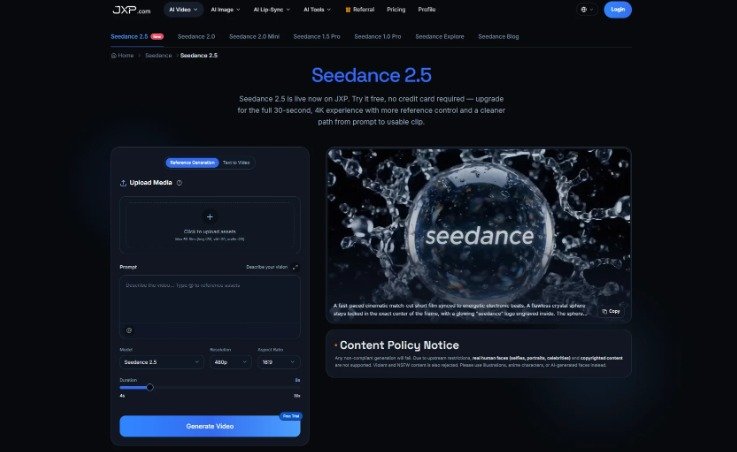
That is where Seedance 2.5 becomes relevant to promo production.
Its reference-oriented workflow can be useful when the creative team already has an approved visual direction and wants to explore motion, staging, and scene order around those materials.
The references guide the creative direction. They don’t remove the need to compare generated output with approved source material.
What Reference-Led Planning Actually Means
A reference-led AI video workflow begins before the final prompt is written.
The team first identifies the parts of the campaign that shouldn’t drift.
For a product promo, that might include:
- the product and packaging
- an established environment
- approved brand imagery
- a platform-supported synthetic or illustrated recurring character
- an agreed visual style
Once those constraints are clear, the sequence becomes easier to plan.
A headphone promo might open on the product beside its packaging, move into a lifestyle scene, and return to a clean product shot at the end.
The prompt still matters. It just isn’t carrying the entire campaign by itself.
References should also be treated as guidance rather than a guarantee of exact reproduction.
The Seedance 2.5 workflow discussed here should not be treated as a face-recognition or real-person likeness workflow. Teams should avoid using real faces, portrait photographs, celebrity likenesses, or other identity-based reference material where the platform does not support them.
When Sound Is Part of the Idea
Now consider a different brief.
A 15-second restaurant promo begins before the viewer sees the finished dish.
First comes the sound of a grill.
Then kitchen ambience.
A plate lands on the counter.
A platform-supported fictional chef delivers one short line.
The background sound falls away as the dish reaches the table.
Here, audio isn’t decoration added after the visuals are finished. It helps determine the pacing.
That makes Veo 3.1’s native audio generation particularly relevant during planning. Dialogue, ambience, sound effects, and visual timing can be developed as parts of the same scene.
An audio-first storyboard might begin with questions such as:
What does the viewer hear in the first two seconds?
Which sound introduces the product?
Does a line of dialogue need space before the next cut?
Should the final reveal land on music, speech, an environmental sound, or silence?
Generated dialogue should not imitate an identifiable employee, spokesperson, celebrity, or public figure without appropriate authority and platform support. If a campaign needs a real chef, founder, or spokesperson, the safer route is to use properly authorized recordings and the normal production process for that person’s contribution.
There Is More Overlap Than the Headline Suggests
References and audio aren’t mutually exclusive.
Veo 3.1 can also work from visual references. Seedance 2.5, meanwhile, can incorporate audio alongside images and video as part of a multimodal reference brief.
The useful distinction is more specific.
With Seedance 2.5, audio can be part of the supplied creative context. With Veo 3.1, native generation of synchronized dialogue, ambience, and sound effects can itself become part of how the scene is constructed.
So the comparison isn’t simply:
References versus audio.
It’s:
Which constraint should organize this particular brief first?
For an established product campaign, visual references may provide the boundaries.
For a concept built around dialogue or atmosphere, audio may determine the rhythm before every visual decision is finalized.
Same goal: a short promotional video.
Very different starting points.
Brand Approval Still Happens Outside the Model
Whichever workflow a team chooses, generated output needs to be checked against the actual campaign materials.
Reference images can guide a generation, but they don’t guarantee exact reproduction.
If a logo matters, use the approved logo in the final edit.
If packaging text needs to be readable, compare it with the approved artwork or composite the original artwork during post-production.
Product proportions, prices, promotional claims, and legal copy should also be checked against approved sources.
Real software demonstrations should use verified screen recordings or approved screenshots rather than generated interfaces.
The same caution applies to people and voices. Teams should not use real faces, portraits, celebrity likenesses, or identifiable voices in workflows that do not support those uses or where the necessary authorization has not been obtained.
Having access to an asset also doesn’t automatically mean it is cleared for external AI processing.
Previous campaign footage, photographs, music, sound recordings, and other references should be company-owned or appropriately licensed for the intended workflow. AI-processing, synchronization, derivative-use, and paid-ad rights may need to be considered separately.
AI video can explore creative treatment.
Brand approval still belongs to people.
The Three-Question Promo Test
Before choosing a workflow, I would ask three questions.
- What cannot change?
If the answer is the product, packaging, approved visual identity, or another brand-critical element, a reference-led approach is worth testing first.
- What carries the emotion?
If dialogue, ambience, sound effects, or musical timing defines the concept, an audio-first workflow deserves early attention.
- What must be exact at delivery?
Logos, prices, legal copy, product claims, packaging text, and interface details should come from verified materials and be checked during final editing.
From there, the first workflow to test becomes easier to identify.
Product, packaging, or brand visuals need close control: Start by testing a Seedance 2.5 reference-led workflow.
Dialogue, ambience, or sound effects define the timing: Start by testing a Veo 3.1 native-audio workflow.
Both visual constraints and sound-led storytelling matter: Test both approaches or use a combined production workflow.
Logos, prices, claims, or legal text must be exact: Use verified assets and human post-production regardless of the model.
A real software interface or product operation must be demonstrated: Use verified recordings, approved screenshots, or original footage.
“Test first” is important. It isn’t the same as declaring one model universally better for a category.
Teams should also compare supported duration, aspect ratio, resolution, cost, availability, and delivery requirements in the exact platform workflow they plan to use. Model capabilities and implementation details can differ between product surfaces and may change over time.
The Best Workflow May Borrow From Both
Reference-led planning and audio-first generation aren’t opposing philosophies.
A good promo may need both.
The useful decision is which constraint establishes the structure first.
For a brand with an established visual library, references may set the boundaries while sound develops around them.
For a campaign built around conversation, atmosphere, or a specific audiovisual moment, audio may establish the timing while references help keep the result aligned with the campaign.
That is a more practical way to think about Seedance 2.5 and Veo 3.1.
Not as two models competing for exactly the same job, but as two possible starting points for different creative briefs.
The question is no longer simply:
“Which model makes the better video?”
A better question is:
“What part of this campaign do we already know we cannot afford to get wrong?”