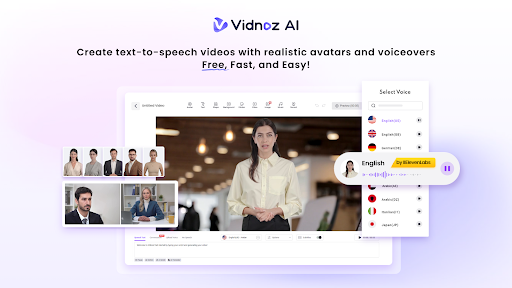
I always wanted to create professional videos without going on camera, but I didn’t have the budget for expensive production equipment. There was no simple or free solution available. Then I discovered Vidnoz AI, a free, AI-powered platform anyone can use to create videos without technical skills. No camera or microphone needed. Just type your script and let the AI handle the rest.
Before I started, I noticed one thing. Vidnoz AI is ISO/IEC 27001, 2022 Certified in Information Security Management. It is a well-recognized security measure. It suggests that the website is well aware of its users’ data protection. I was able to use it immediately without feeling unsafe or fearful. Let me tell you what I found out.
Key Features That Stood Out to Me
After logging in, I spent some time exploring everything the platform had to offer. Here are the features that caught my attention the most:
1900+ Lifelike Avatars
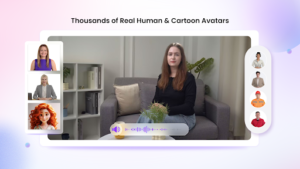
The avatar library made me go, “Wow!” There are more than 1900 realistic avatars of various industries and roles that you can choose from in Vidnoz AI. You will find avatars for healthcare, education, business, sales, and much more. The diversity is hard to beat.
What I liked most is that there is always an existing or customizable avatar to match the context. The platform gives you three useful avatar types:
- Your digital twin: A personalized avatar that looks just like you
- Expressive avatars: Avatars with natural facial expressions and realistic movements
- Product avatar: Ideal for product demos, reviews, and promotional content
2000+ Lip Sync AI Voices
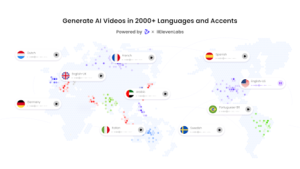
A good video needs a great voice. Vidnoz AI gives you over 2000 natural-sounding AI voices in 140+ languages. These voices are powered by ElevenLabs, Microsoft, and Google. The quality is outstanding.
I tried some English voices, but none sounded robotic. All voices sounded natural and were well pronounced. The lip-sync technology was perfect at matching each word to the avatar’s mouth movements. You will be able to hear the voices before you make your decision. It was a little thing that saved me a lot of time.
2800+ Pre-Designed Video Templates
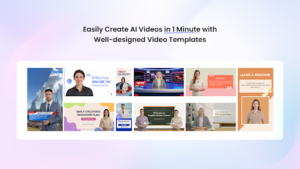
I also spent time going through the template collection, and it was massive. Vidnoz AI has more than 2800 pre-designed video templates for different purposes. From sales videos to AI content marketing, I could find a ready-made design for almost any topic.
Using a template saved me a huge amount of time. I did not have to start from zero or worry about design and layout. I simply picked a template, made a few edits, and moved straight to the next step.
Free Daily Use
Vidnoz AI offers everyone 30 credits for free video generation per day. You do not need to pay anything to get started. This daily free usage gives you enough room to create short videos for social media, product demos, or quick brand updates without paying a cent.
How I Made My First Faceless Video
The process was easy and took me about ten minutes from start to finish. Here is how I did it:
Step 1: Choose a Template and Avatar
I opened the Vidnoz AI Video Generator and browsed through the template library. I picked one that matched my topic and then selected an expressive avatar that looked friendly and professional on screen.
Step 2: Create AI Voiceover
I typed my script into the text editor and selected a voice from the AI voice library. I chose an English voice powered by ElevenLabs. The output sounded natural and matched the avatar’s lip movements very well.
Step 3: Add Custom Touch
I updated the background, changed the on-screen text, and applied my brand colours. The editing tools were simple and worked smoothly, even for someone like me who has no video editing background.
Step 4: Generate AI Video and Share
I clicked generate and the video was ready within a few minutes. I downloaded it and posted it across my social media accounts and a couple of YouTube channels. The engagement was strong, and several followers asked which tool I used to make the video.
My Verdict
After using Vidnoz AI, I can confidently say it is one of the best free tools for making faceless videos. The wide range of avatars, natural AI voices, ready-made templates, and free daily usage make it a great option for content creators, marketers, and small business owners. I plan to keep using it as part of my content strategy going forward.
If you want to create professional-looking videos without showing your face or spending money, I strongly recommend trying Vidnoz AI today.